



News


Man receives Google Meet call from scammer acting as S'pore police, proceeds to waste his time
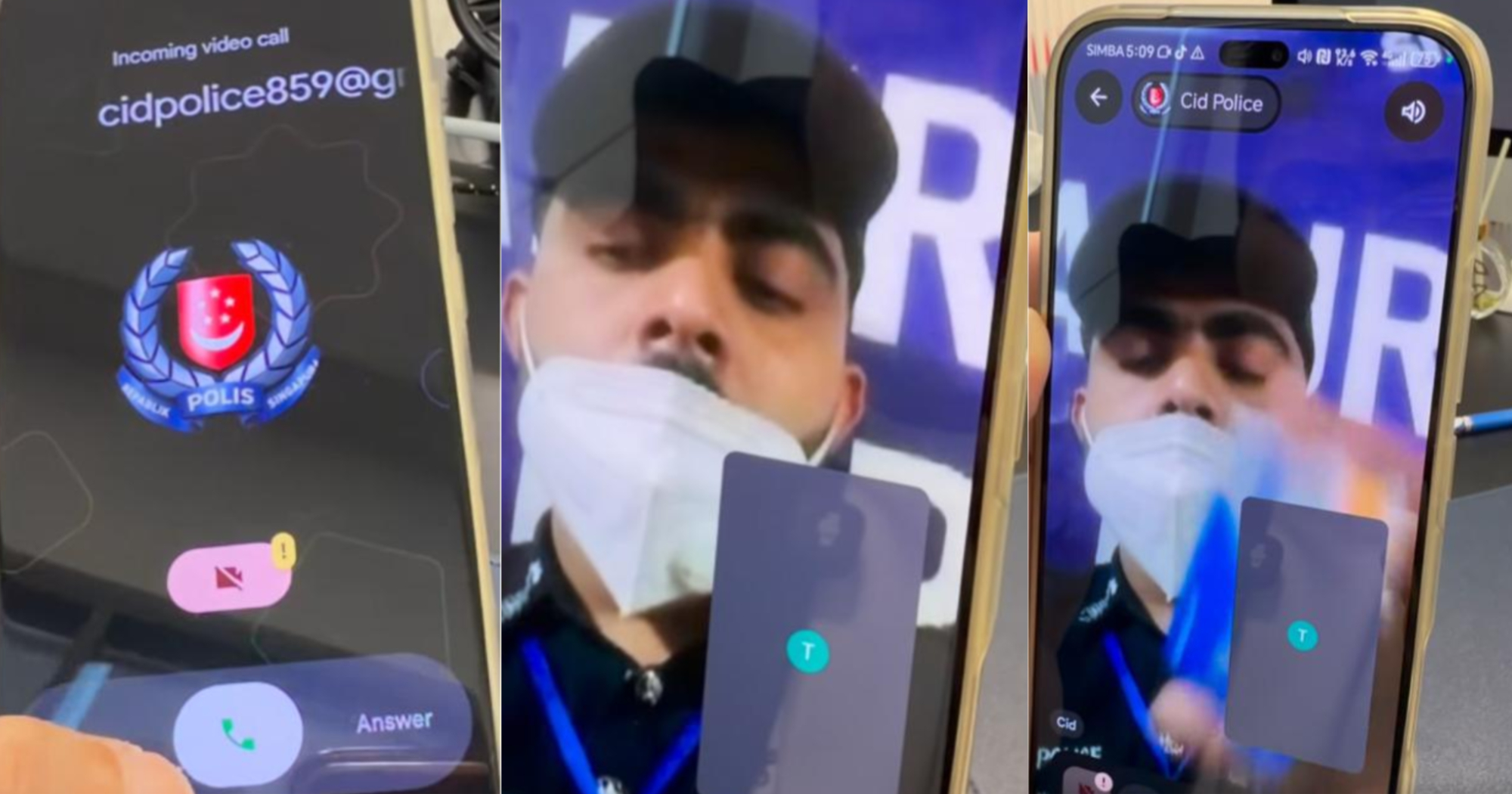
The scammer's username was “Cid Police”.
April 22, 2026, 02:24 AM


A man received a Google Meet video call from a person impersonating a Singapore police officer — and decided to record the conversation on video to be shared online.
In a two-minute Facebook video posted on Apr. 18, the person targeted by the scammer said he was filming content for TikTok when a scam call came in.
The call
The Google Meet video call took place at around 5:08pm.
The recipient of the call could see the Singapore Police Force (SPF) logo displayed as the caller's profile picture, together with the email “[email protected]”.
When the man picked up the call, the scammer was wearing a mask and in a police officer's uniform.
His username was “Cid Police”.
"Michael"
The scammer then claimed that his name was Michael from the police “CID investigation department”.
He then alleged that people were attempting to withdraw S$1,000 from a bank account belonging to the recipient of the call.
The fake policeman then requested to verify the man’s bank details and ATM card number to cancel the transaction.
The scammer’s mask could be seen slipping every time he spoke, revealing his beard.
Confused scammer
The recipient of the call, knowing that the scammer was attempting to gather information on banking details, said his card was lost.
The scammer was seen visibly dumbfounded, but continued to ask to see the recipient's ATM card.
After the call's recipient claimed to have multiple bank accounts, except for a DBS account, the scammer hung up, knowing that the game was up and did not want to waste more time.
The caption of the post reminded viewers to remain vigilant, saying that “scams are getting smarter”.
Police advisory
A SPF press release on Apr. 19 warned against this scam variant.
The police said at least 13 cases of scammers impersonating police officers on Google Meet video calls have been reported in Singapore since Apr. 1, resulting in total losses of at least S$32,000.
For more information on scams, members of the public can visit the ScamShield website at www.scamshield.gov.sg or call the 24/7 ScamShield helpline at 1799.
A Google spokesperson said:
“The most effective way to prevent unsolicited or anonymous calls is to check the ‘Only contacts can call me’ setting. This is one of many layered protections in place to help block phishing and impersonation on Google Meet, on top of our built-in privacy tools. We encourage users to report ‘spam or abuse’ directly within a call and report suspicious behaviour. This helps our systems learn and improve to combat scammers. We encourage everyone to stay vigilant and use these features to stay safe online.”
Top photos via Sunny Toh